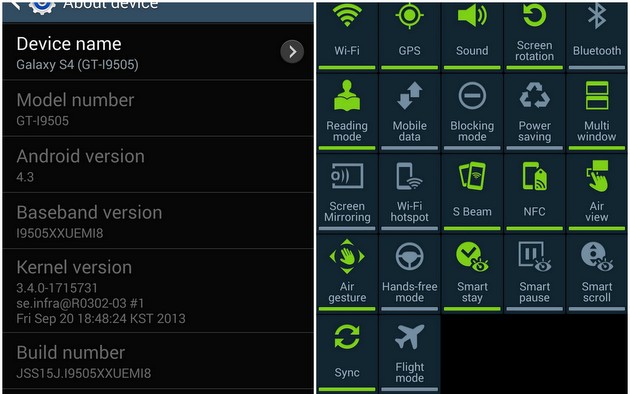
Samsung Galaxy S4 will be getting much awaited Android 4.3 Jelly Bean update soon but if you do not want to wait more SamMobiles leaked an early official test software.
Along with most of the Android 4.3 Jelly Bean improvements, the major changes are support for Samsung KNOX, Samsung Wallet, Reading Mode and improved performance and optimizations. There is no word about support for Galaxy Gear in this software but the final version will definitely add support for recently released Galaxy Gear smartwatch.
This software is only for Galaxy S4 (I9505) variant and use it at your own risk. Grab the leaked Galaxy S4 software here.
As we posted earlier Samsung will roll out Android 4.3 software update for Galaxy S4 sometime this month.
Android 4.3 update for Galaxy S4
Model: GT-I9505
Country: Open Europe
Version: Android 4.3
Changelist: 1715731
Build date: Fri, 20 Sep 2013 18:48:24 +0000
Product Code: OXA
PDA: I9505XXUEMI8
CSC: I9505OXAEMI8
MODEM: I9505XXUEMI8
Download: I9505XXUEMI8_I9505OXAEMI8_I9505XXUEMI8_OXA.zip
Note
- This test firmware will NOT increase your binary counter NOR void your warranty.
- This test firmware is a pre-release firmware and not official from Samsung.
- We have fully tested this firmware and this firmware works perfectly as any other official firmware.
Instructions
- Extract (unzip) the firmware file
- Download Odin3 v3.09
- Extract Odin .ZIP file
- Open Odin3 v3.09
- Restart phone in download mode (Press and hold Home + Power + Volume down buttons)
- Connect phone and wait until you get a blue sign in Odin
- Add AP_I9505XXUEMI8_1715731_REV06_user_low_ship_MULTI_CERT.tar.md5 to AP
- Add BL_I9505XXUEMI8_1715731_REV06_user_low_ship_MULTI_CERT.tar to BL
- Add CP_I9505XXUEMI8_1715731_REV06_user_low_ship_MULTI_CERT.tar.md5 to CP
- Add CSC_OXA_I9505OXAEMI8_1715731_REV06_user_low_ship_MULTI_CERT.tar.md5 to CSC
- Make sure re-partition is NOT ticked
- Click start button, sit back and wait a few minutes.
- If you encounter any issues with the firmware (Any FC, Bootloop etc)
- Boot into recovery mode (Home+power+vol up)
- Choose to wipe/factory reset. (THIS WILL ERASE ALL OF YOUR DATA INCLUDING YOUR INTERNAL SD CARD!)
- Then choose reboot and you should be good to go!